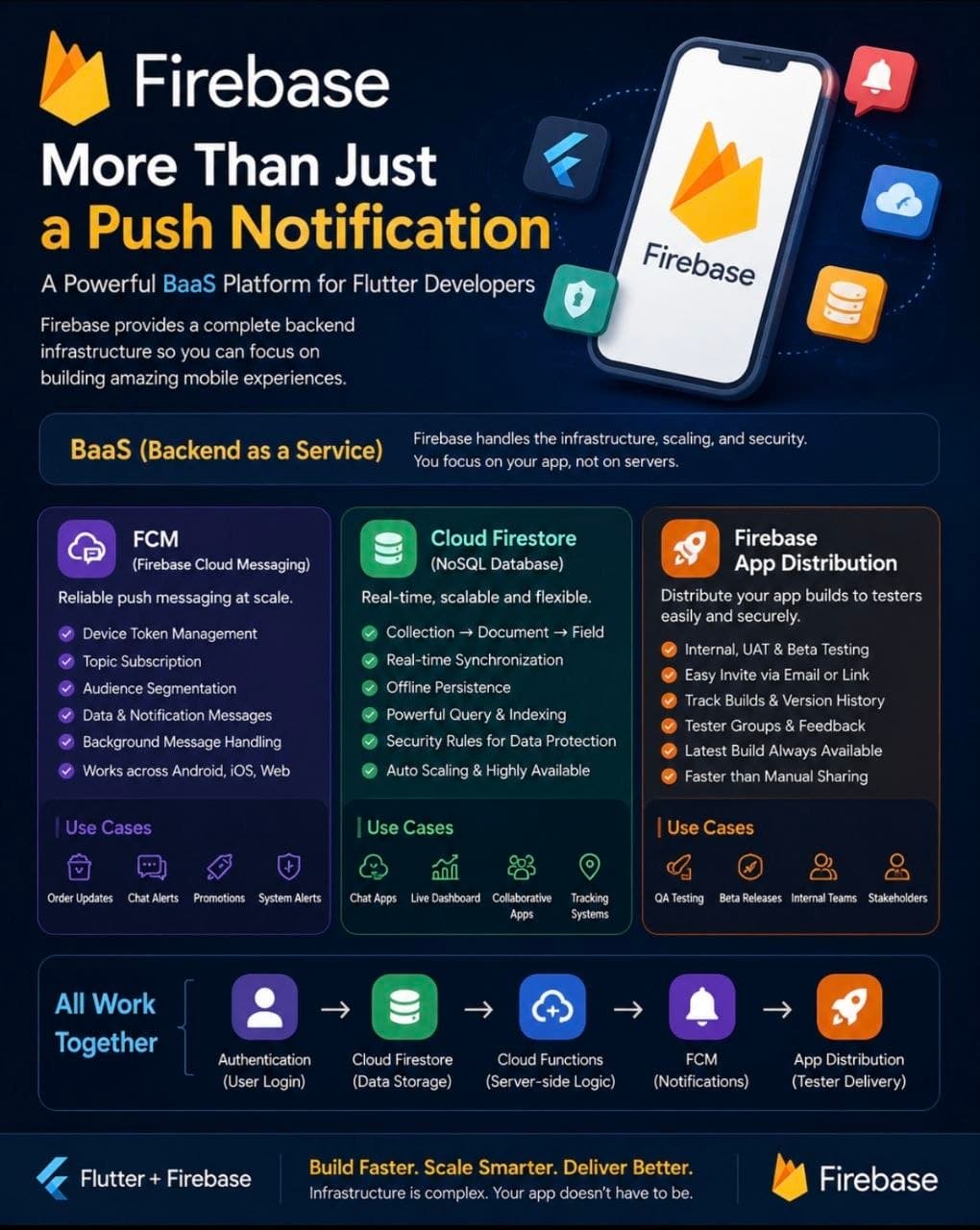
Flutter Developer တော်တော်များများ Firebase ကို စသိတာ FCM (Push Notification) ကနေ စတာများတယ်။
ဒါပေမယ့် Firebase ကို သေချာလေ့လာကြည့်လိုက်ရင် Notification Service တစ်ခုထက် ပိုတဲ့ Mobile Backend Platform တစ်ခုဖြစ်နေတာကို တွေ့ရလိမ့်မယ်။
Firebase ရဲ့ စိတ်ဝင်စားစရာအကောင်းဆုံး Concept တစ်ခုက BaaS (Backend as a Service) ပဲ။
အရင်က Mobile App တစ်ခုရေးမယ်ဆိုရင်
- Backend API
- Database
- Authentication
- Push Notification
- File Storage
- Analytics စတာတွေကို ကိုယ်တိုင် Server Setup လုပ်ရတယ်၊ API ရေးရတယ်၊ Infrastructure ကို ထိန်းရတယ်။
BaaS Model မှာတော့ အဲ့ဒီ Infrastructure အပိုင်းအများစုကို Platform Provider က တာဝန်ယူပေးထားတယ်။Developer က Business Logic နဲ့ User Experience ပိုင်းကို ပိုအာရုံစိုက်နိုင်တယ်။ Firebase က BaaS Platform တွေထဲမှာ Mobile Developer တွေအတွက် Popular အဖြစ်ဆုံး Platform တစ်ခုလို့ ပြောလို့ရတယ်။
FCM(Firebase Cloud Messaging)
FCM (Firebase Cloud Messaging) ကို လူသိများကြပေမယ့် FCM က Push Notification ပို့ရုံတင်မဟုတ်ဘူး။ Device Token Management, Topic Subscription, Audience Segmentation, Background Message Handling, Data Message Delivery စတဲ့ Features တွေပါ ပါဝင်တယ်။
ဥပမာ Food Delivery App တစ်ခုဆိုရင် "Order Accepted" "Rider Assigned" "Order Delivered" လို Event တွေကို Real-time User ဆီ Push လုပ်နိုင်တယ်။
Firestore
Firestore ကတော့ Firebase ရဲ့ NoSQL Cloud Database ဖြစ်တယ်။Traditional Relational Database တွေလို Table, Row, Foreign Key Structure မဟုတ်ဘဲ Collection → Document → Field Structure နဲ့ အလုပ်လုပ်တယ်။
Firestore ရဲ့ အားသာချက်တစ်ခုက Real-time Synchronization ဖြစ်တယ်။ Client A က Data Update လုပ်လိုက်တာနဲ့ Client B,Client C တွေရဲ့ Application ထဲကို Update Event ရောက်သွားပြီး UI က Auto Refresh ဖြစ်သွားတယ်။ Chat System, Live Dashboard, Collaborative Application, Location Tracking System လို Use Case တွေအတွက် အရမ်းသင့်တော်တယ်။ Offline Persistence Support ပါရှိတဲ့အတွက် Internet ပြတ်သွားရင်တောင် Local Cache ကနေ Data ကို ဆက်အသုံးပြုနိုင်တယ်။ Network ပြန်ရလာတဲ့အချိန် Sync ပြန်လုပ်ပေးတယ်။
Firebase App Distribution
Firebase App Distribution ကတော့ Development Lifecycle မှာ အတော်လေး အသုံးဝင်တဲ့ Service တစ်ခုဖြစ်တယ်။ Project တစ်ခုမှာ QA Tester ၁၀ ယောက်၊ ၂၀ ယောက် ရှိလာပြီဆိုရင်APK Build ထုတ်Google Drive တင် Platform တစ်ခုခုမှာ Share ဆိုတဲ့ Workflow က အချိန်ကြာလာတာနဲ့ Manage လုပ်ရခက်လာတယ်။
Firebase App Distribution သုံးရင်
- Internal Testing
- UAT Testing
- Beta Testing အတွက် Build တွေကို Tester Group တွေဆီ တိုက်ရိုက် ဖြန့်ဝေနိုင်တယ်။ Build Version History တွေကို Track လုပ်နိုင်တယ်။Tester တွေကလည်း Latest Build ကို အမြဲတမ်း ရရှိနေမယ်။Google Play Internal Testing နဲ့ ယှဉ်ရင် Setup ပိုမြန်ပြီး Development Team တွေအတွက် ပိုအဆင်ပြေတတ်တယ်။
Firebase ရဲ့ စိတ်ဝင်စားစရာအချက်က Service တစ်ခုချင်းစီ သီးသန့်မဟုတ်ဘဲ Ecosystem အနေနဲ့ အတူတကွ အလုပ်လုပ်တာပဲ။Authentication နဲ့ User Login ဝင်တယ်။Firestore မှာ Data သိမ်းတယ်။Cloud Functions နဲ့ Server-side Logic Run တယ်။FCM နဲ့ Notification ပို့တယ်။App Distribution နဲ့ Tester တွေဆီ Build ဖြန့်တယ်။
ဆိုတော့ Developer တစ်ယောက်အနေနဲ့ Infrastructure Setup လုပ်ဖို့ အချိန်ကုန်တာကို လျှော့ချပြီး Product Development ကို ပိုအာရုံစိုက်နိုင်တယ်။
အဲ့ဒါကြောင့် Firebase ကို Notification Service တစ်ခုအနေနဲ့ မမြင်ဘဲ Mobile BaaS Ecosystem တစ်ခုအနေနဲ့ လေ့လာကြည့်ဖို့ တန်တယ်လို့ ထင်တယ်။